-
-
Browse Categories
Profile
-
Jay Lee
Usernames sjade1, boxofmochi Bday March 29 Gender The one with PMS powers Life Graphic Design & Web Development Supporting Roles Artist. Musician. Code Freak. Entrepreneur. Planning Elopement with Japan. Communities AP | MT | DA MSN boxofmochi @ hotmail SKYPE mykorokke -
Current Desktop

Featured Wallpapers


New on TJN
-
Updates
-
On Twitter
Follow TJN on Twitter!
Search TJN
About TJN
-
 The Jaded Network (TJN) is Jay's monster hobby site of anime, manga, and Japanese language & culture.
Jay is a graphic designer & web developer during the day, and an avid waller at night. More? -
Quick Links
Network
Show Your Support

Affiliates
-

Chrome for Mac
Tuesday, January 26, 2010 | Posted by Jay Unless you live under a rock and don't concern yourself much with the digital age, you'll remember that Google came up with a new browser Google Chrome in late 2008 for Windows PC. Late last year they just released the Beta version for Mac users.
Yay for another browser to deal with? XP
After a few weeks of working with Chrome, I came up with a few observations versus Safari (my primary browser as I am a devout mac user) and Firefox. Please note that this review doesn't compare browser stats such as browser speed or coding differences. This is just my take on the convenience and user-friendliness of a new piece of software.Neat and convenient features in Chrome
1. A smarter way of opening links in new tabs
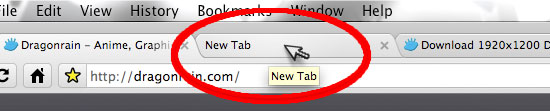
Gotta love this one. Rather than opening links in new tabs at the very end of the chronological line of other open tabs, you can open a new link in a tab that shows up next to the tab you're currently on. It's a small detail that saves you the trouble of sorting through all the other tabs you've got open in a smarter, relative order.2. Dynamic Downloads at the bottom of the window
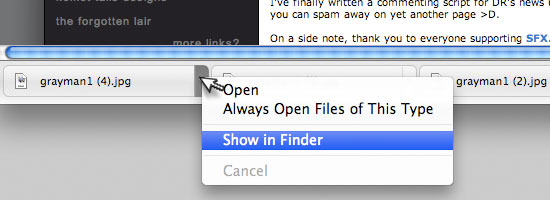
This one is a step up from a feature already in the newest version of Firefox 3.5.5. When you download something, it shows up at the foot of the browser window. You get the see the progress bar while browsing through other stuff, and you also get to manage the files without opening a Downloads window.3. Pretty History Listings
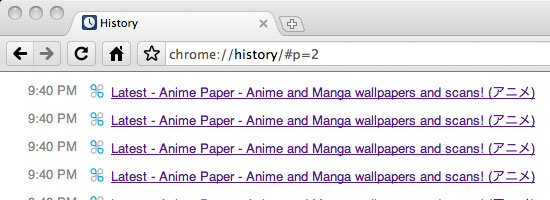
This isn't usually an important feature to me, and it certainly isn't something new, but the way Chrome cleans everything up in a more reader-friendly format instead of the traditional listing of garbled and encoded links and timestamps. Very clean user interface here.4. New Tab: Top Sites
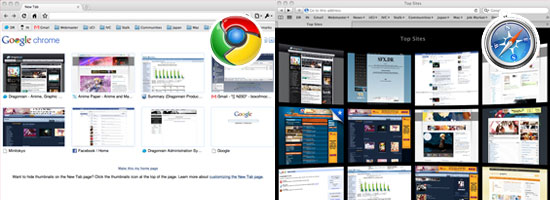
When you open a new blank tab, you arrive at a default page with a customizable "top sites" list in thumbnail format (you can change this to textual lists). This isn't something we haven't seen before - Apple developed a much prettier version of this in Safari (compare the screenshot of Chrome on the left vs the screenshot of Safari 4.0.4 on the right). What IS new in Chrome is you have a few more options in choosing which sites you want listed, such as Recently Closed sites.5. Googling: Even Easier
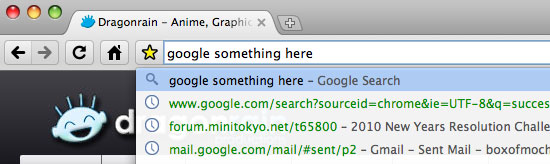
This is a really nifty feature where you can google directly on the search bar itself. Keeps things simple and clear, instead of having to install extra toolbars to use the world's favorite search engine. On a side note, I admire the fact that you can figure this out almost intuitively (I almost never read manuals or how-to documents, so I can appreciate the dummy-efficiency).
Not so convenient things about Chrome
1. No RSS Feed Reader?

This was the biggest problem I had with Chrome - enough that I decided to switch back to Safari and Firefox. I use feeds all the time to check on updates from my favorite sites, and i was very disappointed to find that (1) Chrome does not have a feed reader that can list everything in a neat, human-readable format and (2) Chrome does not offer a default solution to notify me when there IS an update (i.e. in Safari, there's a little parenthesis "(5)" next to the feed bookmark, telling me how many new updates were made since I last visited).
Google addressed this issue this month and there is indeed a "bookmarklet" script you can install.2. Gmail Error
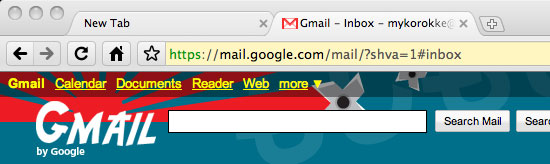
Google Chrome 4 - "Some Gmail features have failed to load"
Google Chrome 4 users might see this error message on trying to sign in. To work around this issue, you can either try another browser or use a different version of Google Chrome, either the current stable version or a dev channel version after rev. 35761.
Well I wasn't so sure what to think of this one. I hit this error several times with my Gmail account using Google's own Chrome browser. But apparently this is a known issue in the beta, so hopefully this will be fixed soon.
Overall though, I did enjoy the thrill of playing around with a new browser. Google certainly has enough reputation to warrant a look at their newest project.
-
More Weblog Entries
 Version 4.0
TJN's got a new facelift! We're now upgraded AWAY from the stone ages - faster code, dividers, organized styling...I'... Read more?
Version 4.0
TJN's got a new facelift! We're now upgraded AWAY from the stone ages - faster code, dividers, organized styling...I'... Read more?
 Tips To Save On Gas
If you remember gas prices shooting up in 2007, well, there were a bunch of emails like this floating around. Instead... Read more?
Tips To Save On Gas
If you remember gas prices shooting up in 2007, well, there were a bunch of emails like this floating around. Instead... Read more?
 Making a Website for the First Time
I've received quite a few emails over the years TJN has been up and running (and while it was known as Dragonrain before... Read more?
Making a Website for the First Time
I've received quite a few emails over the years TJN has been up and running (and while it was known as Dragonrain before... Read more?
New Server 2011
If you're seeing this post, that means that TJN has successfully been relocated to the new server.
Thanks to ... Read more?
 Every Conscious Hour of February 1st 2011
When I first heard about Hourly Comics from Gid, I was like "oh, that's a cool idea" and figured I'd join in for shits ... Read more?
Every Conscious Hour of February 1st 2011
When I first heard about Hourly Comics from Gid, I was like "oh, that's a cool idea" and figured I'd join in for shits ... Read more?
Little Tweaks All Over The Place
Hello hello, I'm back with some site maintenance news and updates! A lot of small changes that filled up quite a few ... Read more?
SFX Translations 102
YAY FOR SFXs!!!Quite a few tweaks made in our SFX Translations section:A Stronger Search Engine - Fully-Compatible with ... Read more?
 The Mask
Well I was gonna dress up as Waldo originally - went to Costume Castle and everything to look for the Harry Potter style... Read more?
The Mask
Well I was gonna dress up as Waldo originally - went to Costume Castle and everything to look for the Harry Potter style... Read more?
 Tree at the Top of the Mountain
I've been having quite a few problems at home (which I commented on AP Clash 2010 during the final round post)...SOOO I ... Read more?
Tree at the Top of the Mountain
I've been having quite a few problems at home (which I commented on AP Clash 2010 during the final round post)...SOOO I ... Read more?
 Mini Crab Chips
So I finally got around to hunting down the local Japanese market, Mitsuwa, and had Ramen there for the first time last ... Read more?
Mini Crab Chips
So I finally got around to hunting down the local Japanese market, Mitsuwa, and had Ramen there for the first time last ... Read more?
-
Highlighted Posts
Current Projects
Completed Projects
WB Galleries
Who is behind TJN?
 My name is Jay Lee, and I have traveled to the East Coast of the United States, studied in Kyoto, Japan for a time, and currently live in Southern California.
My preferred art mediums include: digital on adobe products, corel, web; fine on oil-on-canvas or charcoal; photography in black and white, with a focus on portraiture and music; and classical music on piano.
I work as a graphic designer and web developer with a primary interest in marketing, advertising, and business.
Read more about Jay
-







 Copyright © 2026 theJADEDnetwork.Com
All Rights Reserved
Use of this Site and/or any of its materials signifies
user agreement to the TJN Terms and Conditions